Find the right AI tool.
Make something useful.
Independent guides, honest trade-offs and practical workflows. Start with the task you want to finish.
Start with a task suggestion, then confirm your requirements. Browse all tools →
A newsletter worth opening.
“Help me write a weekly newsletter from my research notes.”
01Drafting or editing?
02What is your budget?
03Do you need a brand voice?
A starting point, not a recommendation. Your requirements shape the shortlist.
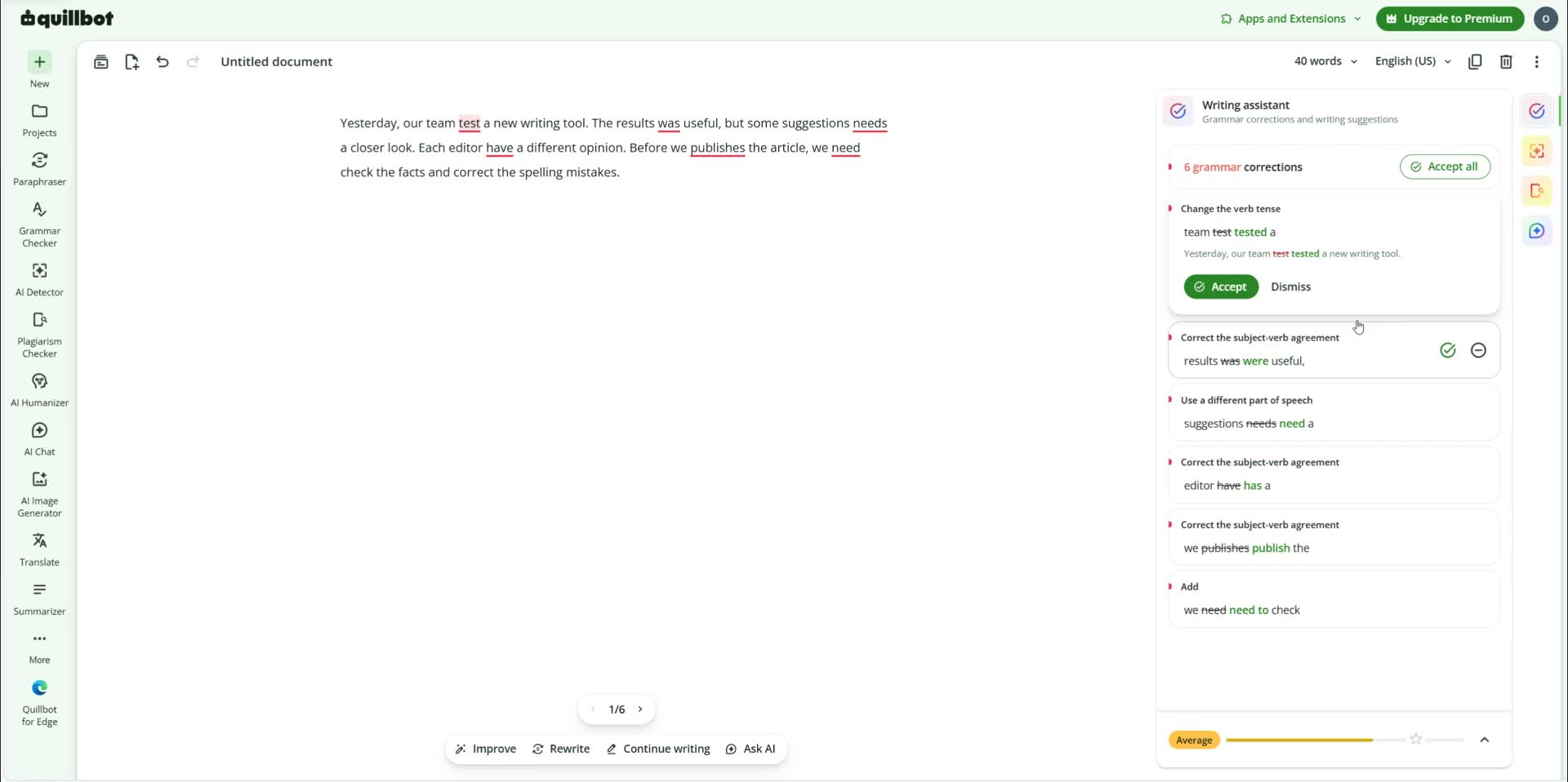
IN THE TEST NOTEBOOK · QUILLBOT
Better writing starts
with a closer look.
We tested the free Paraphraser, Grammar Checker and Summarizer with controlled English samples. See what changed, what stayed, and what to check yourself.
BEFORE YOU SUBSCRIBE
Two good options. Different jobs.
02 — From choice to action
A tool is a start.
A workflow gets you there.
Choose a real task. Explore a sample outcome, choose a plan, then practice with the tools.
Showing 1–6 of 25 workflows
Editorial plans with manual handoffs. Tool suggestions are options, not tested integrations or a promise of results. Stars save for later; thumbs record anonymous reader feedback, not verified user ratings. How feedback works →
QuillBot: one draft, three directions
Choose an article, a confident email or short-video copy. Start with clearer words and add only the tools your result needs.
You want clearer English and a practical route from a draft to a useful result.
Your own checked draft or recording, a target audience and one clear next action.
| Your goal | Takeaway |
|---|---|
| Article & content kit | Opening paragraph, script and post copy |
| Work email | A clear request and review checklist |
| Video repurposing | Clip review sheet, title and caption |
Editorial examples, not provider-generated outputs. Open the guide to choose a route and copy your brief.
Explore the 4 steps, prompts & checks
Choose your result and prepare the facts
Choose one outcome- Input
- Your own checked draft or recording, a target audience and one clear next action.
- Deliverable
- A fact-checked brief
- Human checkpoint
- Choose the article, work-email or video route; keep confidential details out.
Prompt to adapt
Audience: [reader]. Goal: [article / email / video]. Verified facts: [list]. Keep unchanged: [names, dates, quotes].
If it goes wrongGather missing facts before polishing.Compare and polish your wording in QuillBot
Review your wording- Input
- A fact-checked brief
- Deliverable
- A revised passage with meaning preserved
- Human checkpoint
- Preserve facts, names, quotations and numbers when editing.
Prompt to adapt
Paste your original passage into Paraphraser, compare Standard and Fluency, then review grammar. This is an instruction sheet, not text to paste as a command.
If it goes wrongRestore any changed fact or misrepresented quotation.Select optional tools for your final format
Optional format toolsOptions for this stage — choose one.Compare these options →- Input
- A revised passage with meaning preserved
- Deliverable
- Your chosen text, narration or clip
- Human checkpoint
- Choose alternatives rather than subscribing to every suggested tool.
Prompt to adapt
Decide whether text is sufficient. Choose one voice tool for narration, or OpusClip for an existing recording. Confirm the import format on the provider.
If it goes wrongSkip extra tools if the base result meets your need.Review the result and publish it yourself
Your final review- Input
- Your chosen text, narration or clip
- Deliverable
- A publishable draft and an actionable next step
- Human checkpoint
- Confirm meaning, export rules and links before publishing.
Prompt to adapt
Check names, claims, dates, subtitles, rights and links in the final export. Publish in your own workspace.
If it goes wrongKeep a draft if the final result changes the intended message.
Murf and ElevenLabs are voice alternatives. OpusClip is for existing footage. Open the dedicated guide to compare all seven optional products by role.
Start with QuillBot and your existing editor. Separate voice and video subscriptions are optional.
03 — Explore the possibilities
A closer look at the tools.
Editorial picks with their limitations in view.
An AI writing assistant for paraphrasing, grammar checking, summarizing, and tone adjustments.
Free plan availableFit & limitations
Best for: Students, professionals, and teams editing everyday writing quickly.
Consider: Free mode has a per-run word limit

A general-purpose AI assistant for drafting, research support, analysis, and workflow help.
Free plan availableFit & limitations
Best for: Creators, marketers, solo operators, and teams exploring flexible AI assistance.
Consider: Outputs still require human review
An AI assistant commonly used for writing, document analysis, coding support, and research workflows.
Free plan availableFit & limitations
Best for: Writers, analysts, founders, and teams reviewing long-form documents.
Consider: Feature availability can vary by region and plan
An AI answer and research tool oriented around cited web research and fast source discovery.
Free plan availableFit & limitations
Best for: Researchers, marketers, and creators who compare source-backed answers.
Consider: Source quality still needs human review
A design and creator platform for social assets, presentations, marketing visuals, and brand content.
Free plan availableFit & limitations
Best for: Creators, marketers, and small businesses producing recurring visual content.
Consider: Advanced design needs may require specialist tools

A video and audio editing platform for creators, podcasts, tutorials, and content repurposing.
Free plan availableFit & limitations
Best for: Creators and small teams editing video, audio, and repurposed content.
Consider: No original editing project or screenshots are documented

An AI-powered code editor that combines editor workflows with agent, chat, and code-completion assistance.
Free plan availableFit & limitations
Best for: Freelance developers, founders, and small engineering teams who code daily.
Consider: Free usage limits are intentionally limited

Google's AI assistant for search-adjacent research, writing, and productivity workflows.
Free plan availableFit & limitations
Best for: Readers already working inside Google products and search workflows.
Consider: Product features can change quickly
A writing assistant for grammar, clarity, tone, and editing support across common workflows.
Free plan availableFit & limitations
Best for: Professionals who want writing support across email, documents, and content.
Consider: Some recommendations may not fit every brand voice

AI features inside Notion for notes, docs, knowledge bases, and team productivity workflows.
Paid productFit & limitations
Best for: Individuals and small teams already managing work in Notion.
Consider: No current test workspace has been documented for this page

An AI image and video generation service known for high-quality visual output across paid subscription tiers.
Paid productFit & limitations
Best for: Creators, agencies, and small teams producing visual concepts and campaign imagery.
Consider: No free plan

An AI generation tool for presentations, documents, and visual content built for fast idea communication.
Free plan availableFit & limitations
Best for: Founders, educators, marketers, and creators who need polished presentations quickly.
Consider: Free credits are one-time and not replenished

An AI research and creative platform for generating and editing images, video, and audio.
Free plan availableFit & limitations
Best for: Creators and small teams experimenting with AI video generation and editing.
Consider: Free credits are limited and one-time

An AI voice platform for text-to-speech, voice cloning, dubbing, and audio generation.
Free plan availableFit & limitations
Best for: Creators, audiobook producers, and product teams needing consistent AI voices.
Consider: Advanced cloning and quality features sit in paid plans

A voice platform for turning scripts into narration and building voice-enabled experiences.
Free plan availableFit & limitations
Best for: Creators preparing narration for explainers, training and presentations.
Consider: Check export limits and commercial-use terms for the selected plan
An AI meeting notetaker that records, transcribes, and summarizes live and imported conversations.
Free plan availableFit & limitations
Best for: Professionals and small teams who want automatic notes from virtual meetings.
Consider: Free conversation length and rollover are limited
A workflow automation platform for connecting apps and automating repeatable business tasks.
Free plan availableFit & limitations
Best for: Small teams and operators automating common app-to-app workflows.
Consider: No documented automation test is attached to this page
A visual automation platform for building multi-step workflows across connected apps.
Free plan availableFit & limitations
Best for: Operators who want visual control over multi-step automation scenarios.
Consider: No documented scenario test is attached here

GitHub's AI coding assistant for inline code suggestions, chat, agents, and repository workflows.
Free plan availableFit & limitations
Best for: Developers and small teams already working inside GitHub and popular code editors.
Consider: Free features are limited compared with paid plans
04 — Make an informed choice
Useful reading.
Before you subscribe.
QuillBot vs Rytr: Edit a Draft or Generate New Copy?
Choose QuillBot when you already have words to improve, or Rytr when you need a first marketing draft from a short brief.
Murf AI vs ElevenLabs for Voiceovers
Compare a guided voiceover studio with a broad speech platform before choosing a paid voice workflow.
Pictory vs OpusClip: Create a Video or Repurpose One?
Choose by your starting asset: a script or document, or an existing long video that needs short clips.
OpusClip vs Agent Opus: Clips from Footage or Video from an Idea?
These related products solve different first steps: finding short clips in footage or building a video from a prompt and source material.
ElevenLabs vs Descript for AI Voice Workflows
A documentation-based comparison for creators choosing between a voice-generation platform and an editing workspace with built-in AI speech.
Synthesia vs HeyGen for Avatar Video Workflows
A documentation-based comparison for teams planning avatar videos, localization, training content, and repeatable video production.
Proofread an English Project Update with Grammarly
A short editing exercise that separates grammar corrections from changes to your commitments, numbers and tone.
Plan Your First Make Automation Before Connecting Live Data
Design a small record-copy workflow, define what counts as success and test duplicate handling before letting it run unattended.
How to Edit an English Email with QuillBot: A Practical Checklist
A step-by-step workflow for improving an email while keeping your facts, intent, and personal voice intact. Start with a short draft before deciding whether you need a paid plan.
How to Plan an ElevenLabs Voiceover Workflow
A reproducible voiceover workflow based on current ElevenLabs documentation, with the checks that matter before commercial use.
How to Plan a Synthesia Script-to-Video Workflow
A documentation-based workflow for preparing a consistent Synthesia script-to-video project and checking the plan limits that affect delivery.
05 — The full directory
Browse by category.
Useful advice shows
its working.
We keep sources, check dates and limitations attached to the tools. Our guided finder separates documented matches from things that still need verification.
Affiliate links never determine the finder’s order. Research overviews are labeled clearly; we do not imply hands-on tests we have not completed.
How we research and recommend →